DJ Dog game menu and the strip of controls under the reels
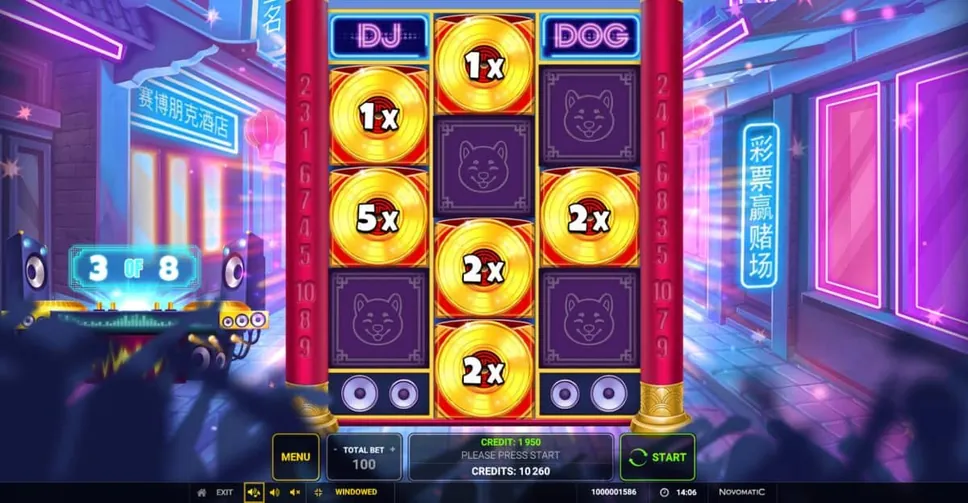
There is exactly one interactive strip on this screen and everything you can press is in it. Nothing in the scenery is a button, nothing in the grid is a button, and the one piece of information that is not in the strip is the feature counter.

The screenControls
What sits in the strip, left to right
Four blocks across the main row. At the far left, a menu button. Beside it, the stake, with a minus to its left and a plus to its right and the current figure underneath. In the middle, a wide message panel carrying two figures and a line of text between them. At the far right, the spin control, marked with a circular arrow.
The spin control is the largest single element in the strip and the only one outlined in a different colour, which is the interface telling you which action it expects. Worth noticing in the opposite direction too: the stake stepper is small, its two arrows are small, and they sit close together.
Two balance figures that are not the same number
The middle panel carries a figure labelled credit on its top line and a figure labelled credits on its bottom one, with a message between them — in the still above, a prompt to press start. The two labels differ by a single letter and the two figures are nowhere near each other.
This page is not going to guess which is which. What it will say is that a game screen showing you two numbers that both look like your balance is a screen to read properly before the first spin rather than after it, and the place that defines them is the game’s own panel behind the menu. If you take one of the two for your balance and it is the other, every stake decision after that is made on a wrong figure.
The menu, and what is behind it
The menu is where the game keeps the material that does not fit on screen: the rules, the paytable with every symbol value on it, the settings, and the account of how the feature works.
It is also the only authority on this game that is guaranteed to match the build you are playing. Outside accounts of this title disagree with each other on the grid and on the maximum, and a page written about one operator’s version cannot know what another has configured. The panel behind that button was written for your copy.
The small switches along the bottom edge
Below the main row runs a thinner strip in a smaller type: a way out of the game, three audio controls in a group, a windowed-or-full-screen toggle, and at the right-hand end a long session reference and a clock.
The three audio controls are separate rather than one toggle, which matters on a game this loud: the music, the effects and silence are three different states and they are set independently. Turning the sound down costs you nothing you need, because every state of this game is also shown on screen — the lit line, the counter, the records.
The clock is the piece of that row worth going out of your way to notice. A game screen is a room without windows. Nothing in the lighting changes, the music loops, and a round takes about a second, so the only thing on the screen that tracks the one quantity you cannot get back is a small set of digits in the corner.
What a British build does not show
Two things that appear in accounts of this game written for other markets are absent here. There is no control for playing rounds automatically, and there is no button for buying the feature outright.
Both absences follow from British rules rather than from anything the studio decided, and a British review of this title states as much for each of them. If you are reading a description of DJ Dog that walks you through an autoplay panel or a purchase lantern, it was not written for a British screen.
The stake stepper is affected too. Its floor is 0.10 wherever you play, but the British cap on a single round is £5, which is a long way below the ceiling accounts written elsewhere describe.
About the controls
Where is the DJ Dog menu button?
At the far left of the control strip under the reels, before the stake stepper. Behind it are the rules, the full paytable and the settings, and that panel is the only description of the game guaranteed to match the build you are playing.
Why does the game show two different balance figures?
The middle panel carries one figure labelled credit and another labelled credits, and they are different numbers. Which is which is defined in the game’s own panel behind the menu, and it is worth reading there before the first spin rather than assuming.
How do I change the stake?
With the minus and plus either side of the stake box in the control strip. The figure shown is the total for the round, not an amount per line — all 10 lines are fixed and permanently live.
Does DJ Dog have autoplay?
Not on a British build. Accounts written for other markets describe one, and a British review says in so many words that the control is absent here. The same goes for the option to buy the feature.
Can I turn the music off and still follow the game?
Yes. The audio controls are a group of three rather than one toggle, so music and effects are set separately, and every state of the game is shown visually as well — the lit line, the feature counter, the records on the grid.
What is the return on DJ Dog?
This site does not state one, and the reason is not caution for its own sake. The studio does not publish a return for this game — its specification block lists the game type, the swing and the platforms, and stops there — and the pages this site was rewritten from named no return either. There is no figure to pass on.
What exists is a figure other people print: 95%, carried by three independent pages about the game and by at least one operator lobby. One of those pages words it as the studio having rated it so, but that is the page speaking about the studio rather than the studio speaking, and it is not what the studio's own page says. A separate figure of 95.02% is quoted for the version with the feature bought outright, which Britain does not get.
So treat 95% as a number in circulation rather than as this game's specification, and read the information panel behind the menu in the copy you are signed in to. That panel is written for your build, and it is the only place the figure is stated by something that knows it.
One strip, four blocks, a thin row of switches and a clock. All of it moves when the screen narrows, which is the last page.
Carry on with
The phone layout follows directly from this page. The ten lines explains why the stake box holds one figure rather than a per-line amount.
The eight-spin round covers the one readout that is not in this strip, and the overview puts the whole screen back together.